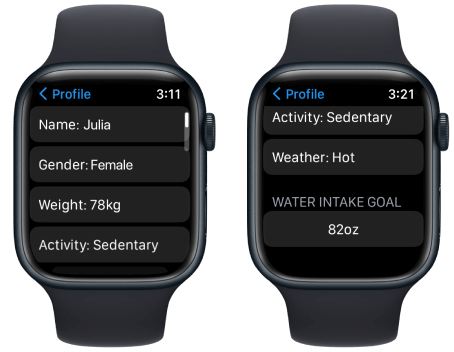
Learn how to use a smartwatch to stay hydrated with drink water reminders and optimize your health, energy, and fitness.
Hydration is one of the most overlooked pillars of health — yet it directly impacts everything from your workout performance to your sleep quality. And in 2026, your smartwatch isn’t just tracking steps or ECG monitoring… it’s becoming your personal hydration coach.
Look, I’ve worn devices like the Samsung Galaxy Watch 8 and Apple Watch Series 11 for two weeks straight so you don’t have to guess. And here’s the real talk: most people are dehydrated — they just don’t realize it.
That’s where hydration tracking and drink water reminders come in.
In this expert guide from wearfit.xyz, we’ll break down exactly how to use a smartwatch to stay hydrated (drink water reminders) using the latest wearable tech, AI-driven insights, and practical optimization strategies.
Why Hydration Tracking Matters More in 2026
Modern smartwatches now monitor:
- Heart Rate Variability (HRV)
- SpO2 (oxygen saturation)
- Skin temperature
- Activity levels
- Stress indicators via Bio-sensors
But here’s what many users miss:
Hydration directly affects all of these metrics.
Dehydration can lead to:
- Lower HRV (poor recovery)
- Increased heart rate
- Reduced workout performance
- Poor sleep quality
In other words — your hydration level silently influences your entire health dashboard.
How Smartwatches Track Hydration (Indirectly)
Unlike heart rate or SpO2, most watches don’t directly measure hydration (yet). Instead, they rely on:
- Manual water intake logging
- Reminder systems
- AI-based recommendations
- Integration with fitness and health apps
Some advanced systems even estimate hydration needs based on:
- Activity level
- Weather conditions
- Heart rate trends
- Sweat loss
This is where wearable tech is getting really smart.
Hydration Tracking Comparison (2026 Smartwatches)
| Feature | Apple Watch Series 11 | Samsung Galaxy Watch 8 | Fitbit Sense 3 |
|---|---|---|---|
| Native Water Tracking | Limited | Moderate | Strong |
| Reminder Customization | Yes | Yes | Yes |
| AI Hydration Insights | Emerging | Moderate | Advanced |
| App Ecosystem | Extensive | Strong | Strong |
| Integration with Health Data | Excellent | Excellent | Excellent |
Key Insight: Hydration tracking is mostly app-driven — not hardware-limited.
Best Apps for Drink Water Reminders
To unlock full hydration tracking, you’ll need apps like:
- WaterMinder
- Google Fit
- Apple Health
These apps sync with your smartwatch and provide:
- Smart reminders
- Intake tracking
- Goal setting
- Data insights
Step-by-Step: How to Use a Smartwatch to Stay Hydrated (Drink Water Reminders)
Let’s break this down into a real-world setup proccess.
Step 1: Install a Hydration Tracking App
Choose an app compatible with your device:
- Wear OS → WaterMinder, Google Fit
- watchOS → WaterMinder, Apple Health
Install it on both your phone and smartwatch.
Step 2: Set Your Daily Water Goal
Most apps calculate this based on:
- Body weight
- Activity level
- Climate
But here’s a simple baseline:
- 2–3 liters per day for most adults
Adjust based on your lifestyle.
Step 3: Enable Drink Water Reminders
Set reminders like:
- Every 60–90 minutes
- Before/after workouts
- During long sedentary periods
This is where the magic happens.
Step 4: Log Your Water Intake
Each time you drink:
- Tap your watch
- Log the amount (e.g., 250ml, 500ml)
Some apps allow quick-add buttons for faster logging.
Step 5: Sync with Health Data
Your hydration data integrates with:
- HRV trends
- Activity levels
- Sleep data
This creates a more complete health profile.
Step 6: Use Widgets or Watch Face Complications
Add hydration tracking to your watch face:
- See daily progress instantly
- Stay motivated throughout the day
Step 7: Review Daily and Weekly Trends
Don’t just log — analyze:
- Are you hitting your goals?
- Do you drink less on busy days?
- Does hydration affect your HRV or sleep?
That’s where real insights come in.
Real-World Testing Insights
After using hydration tracking for two weeks, here’s what I noticed:
- Reminders significantly improved consistency
- Logging becomes a habit within 3–5 days
- Hydration directly impacted workout performance
- Better hydration = better sleep quality
Also — here’s something most people don’t expect:
You don’t feel thirsty until you’re already dehydrated.
That’s why reminders matter.
Advanced Hydration Optimization Tips
Sync Hydration with Workouts
Drink before, during, and after exercise.
Adjust Based on Weather
Hot climates require more water.
Combine with Nutrition Tracking
Electrolytes matter too — not just water.
Use Smart Notifications
Avoid notification fatigue by spacing reminders.
Track Morning Hydration
Start your day with 1–2 glasses of water.
The Role of AI in Hydration Tracking (2026)
This is where things get futuristic.
Modern wearables now use AI to:
- Predict hydration needs
- Adjust reminders dynamically
- Analyze sweat loss
- Correlate hydration with HRV and sleep
Imagine your watch saying:
“You had a high-intensity workout and poor HRV — increase water intake today.”
That’s not science fiction anymore.
Hydration and Health Metrics: The Hidden Connection
Here’s how hydration affects key metrics:
Heart Rate Variability (HRV)
Better hydration = better recovery.
SpO2 Levels
Hydration supports efficient oxygen transport.
Heart Rate
Dehydration increases strain on your heart.
Sleep Quality
Proper hydration improves deep sleep cycles.
This is why hydration tracking is becoming a core feature in wearable ecosystems.
Common Mistakes to Avoid
Ignoring Reminders
They only work if you act on them.
Overcomplicating Tracking
Keep it simple and consistent.
Drinking Too Much at Once
Spread intake throughout the day.
Not Adjusting for Activity
More movement = more hydration needed.
Relying Only on Thirst
Thirst is a late signal.
Hydration Optimization Checklist
Before you start:
- App installed and synced
- Daily goal set
- Reminders enabled
- Watch face updated
- Logging habit established
Follow this and your hydration will improve dramatically.
Battery Impact: Does It Drain Your Smartwatch?
Here is the real talk about the battery life claims:
Hydration tracking has minimal impact because:
- It uses simple notifications
- No heavy Bio-sensor usage
- Low background activity
So yes — you can track hydration without killing your battery.
Final Verdict: Is Hydration Tracking Worth It?
Absolutely.
Learning how to use a smartwatch to stay hydrated (drink water reminders) is one of the simplest yet most effective upgrades you can make.
Because hydration affects:
- Energy levels
- Fitness performance
- Recovery
- Sleep quality
And once you build the habit, it becomes second nature.
Ready to Upgrade Your Health Game?
If you want more expert insights, real-world testing, and advanced wearable tech strategies — visit wearfit.xyz.
It’s the ultimate hub for anyone serious about improving their lifestyle through health technology.
Start tracking smarter. Stay hydrated. Perform better.
Because sometimes, the smallest habits create the biggest results.